The job tracker that fills in the paperwork
Capture a job in one click, autofill the application, and auto-log the weekly work-search contacts unemployment requires.
Sign in with Google — no credit card required
On a phone, or already added it?
Unemployment Work-Search Autofill
Auto-log the weekly job contacts your state requires so a paperwork miss never costs you benefits
One-click capture
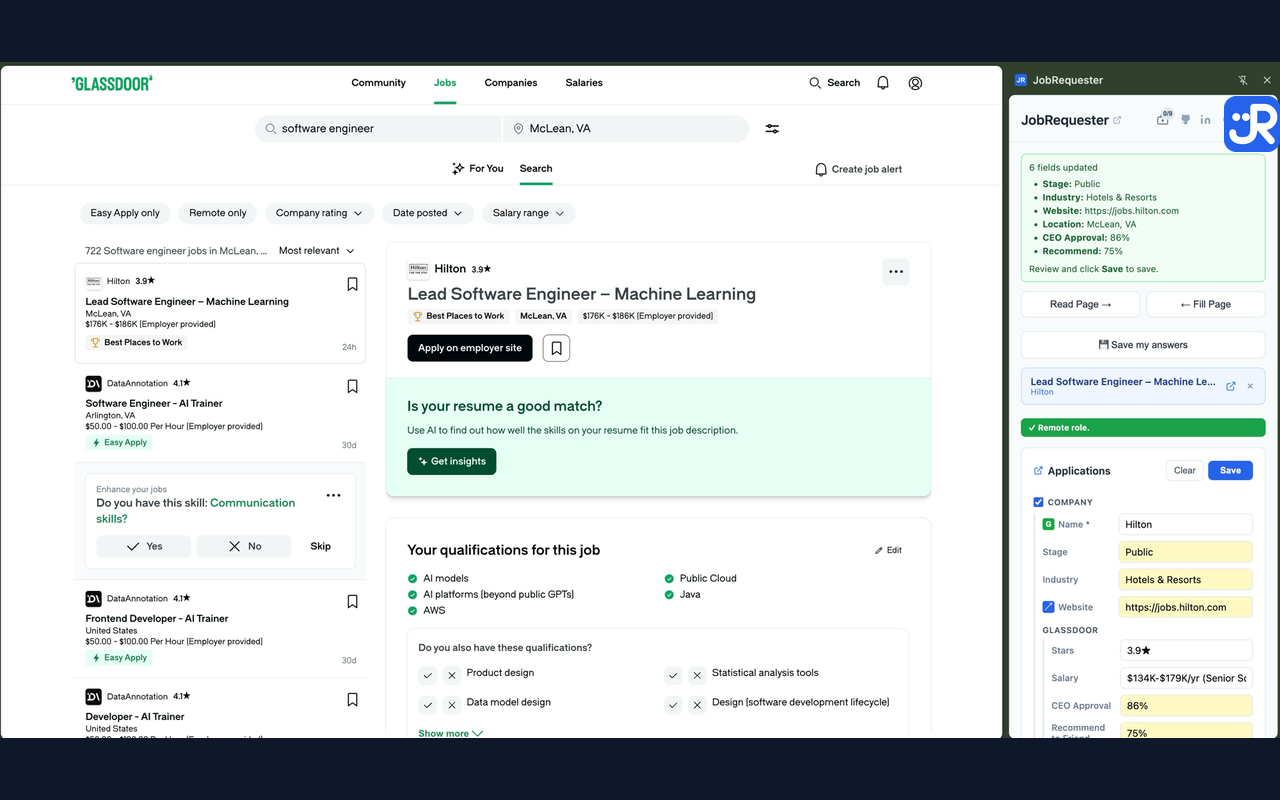
Read the page. Keep the numbers.
Open the side panel on a job listing and hit Read Page. Title, company, location and posted salary come across, along with the Glassdoor rating, CEO approval and pay range for that employer — so you can tell a good listing from a bad one without opening a second tab.
Your whole search, one list
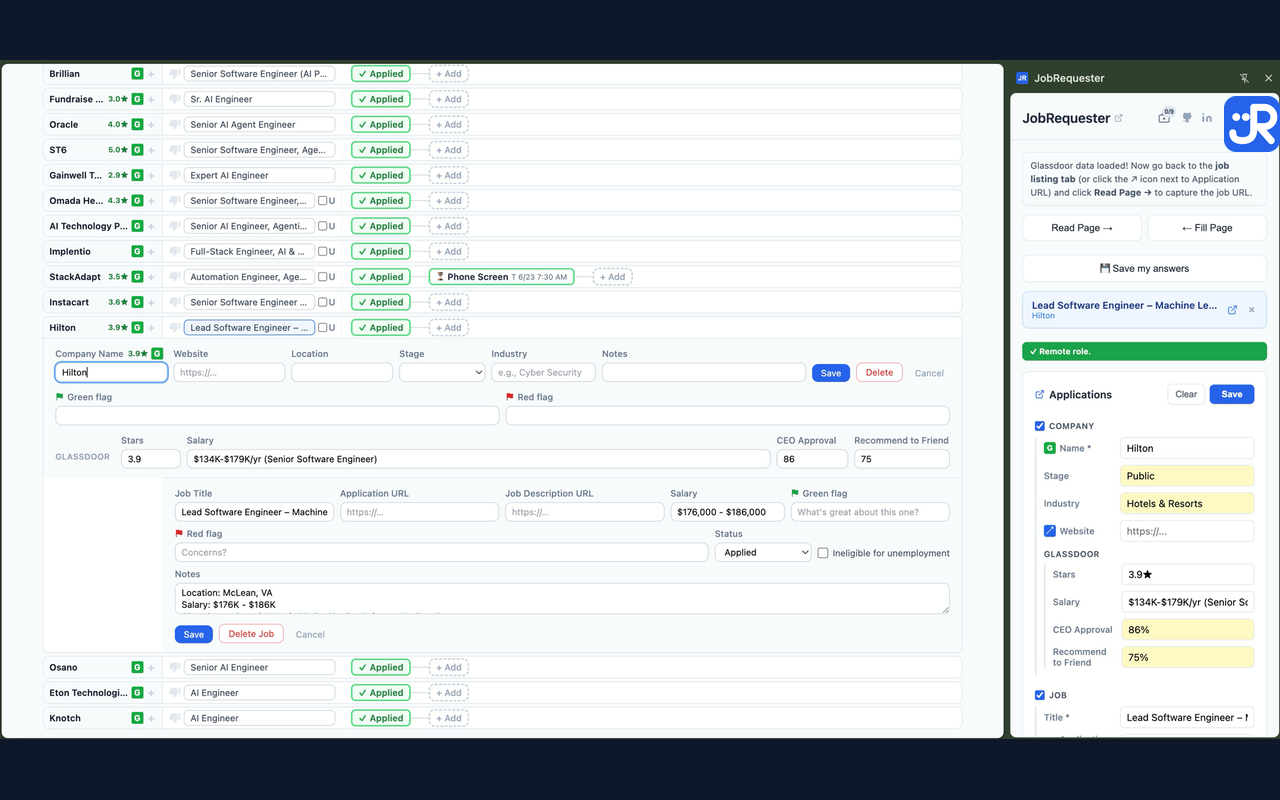
Every application, grouped by company.
Roles sit under the company they belong to, with the stage, the salary, the recruiter and the interview dates attached. Edit any of it inline — no modal, no page load. Green flags and red flags are yours to write, and they are what you will actually re-read three weeks later.
Work-search logging
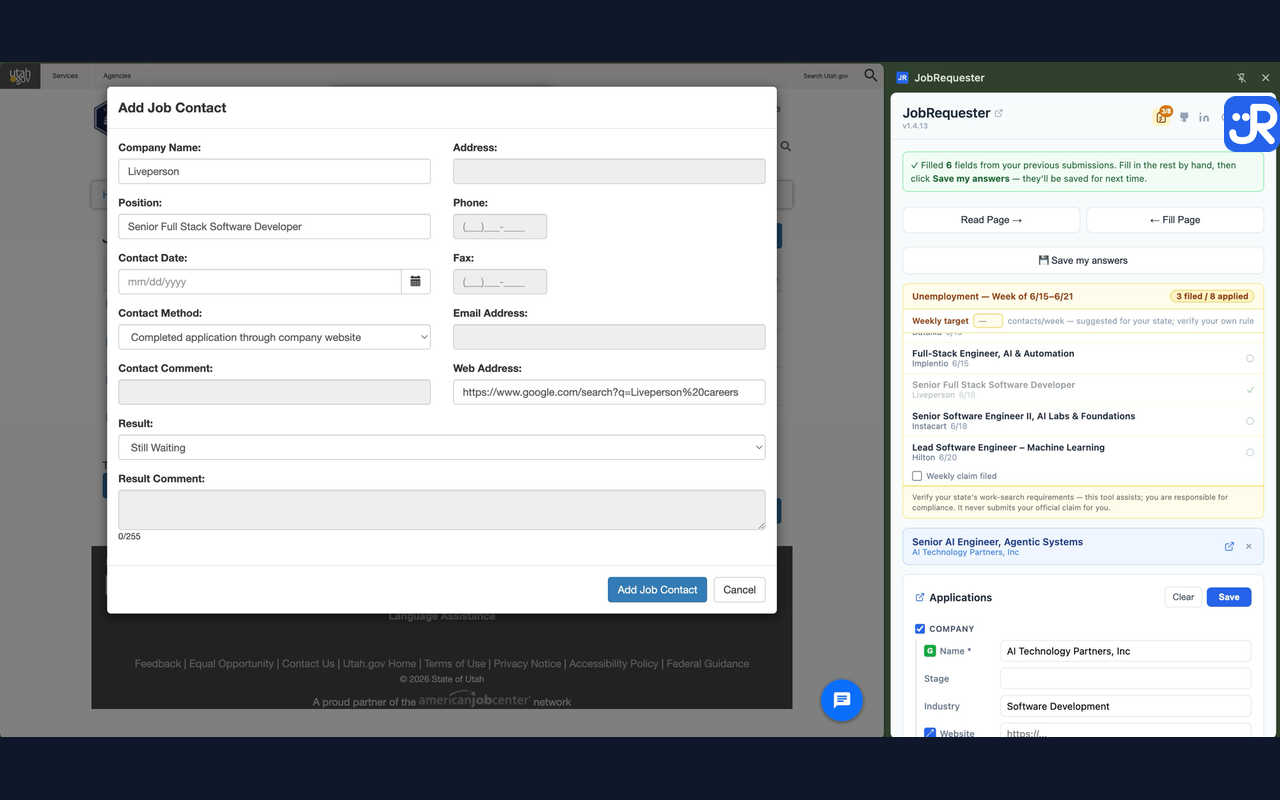
The weekly paperwork, filled in for you.
If you are claiming unemployment, the state wants a list of the jobs you contacted this week. JobRequester already has that list. It counts the week for you, marks which ones you have filed, and fills the contact form from the application you already tracked. You still review and submit — it never files a claim for you.
Application autofill
Autofill that’s free — and that you can trust
Upload your resume once. On any application form, press Fill Page and your saved answers go in where they belong — then you check it and submit.
Free, with no fill limit
Fill Page is part of the free plan. There is no per-fill credit, no daily cap and no upgrade prompt in the middle of an application.
It never types over you
Any box you have already filled in is left alone, so pressing Fill Page twice — or after you started typing — never overwrites your own answer.
You see exactly what it filled
It tells you how many fields it filled and lists each one in the side panel, so checking the form takes seconds instead of a re-read.
Built for real application forms
Text boxes, dropdowns, yes/no questions, Workday’s pop-up lists, searchable selects, and the resume upload itself — on the applicant tracking systems most companies use.
Gets better every time you use it
Fill in whatever it missed, click Save my answers, and the next form with that question is filled for you.
You press submit, always
It fills; it never applies. Nothing is sent to an employer until you have looked it over and clicked their button yourself.
One-Click Salary Capture
Pull Glassdoor pay data into an application in a click
Analytics Dashboard Pro
Channel ROI, interview conversion rates, and salary correlations
Free Application Autofill
Upload a resume once and let the side panel fill the form — free, no fill limit, and it remembers every answer you save
Email & Interview Tracking
Read a recruiter email or interview invite and it files itself against the right job, with the time on your calendar
How it works
Three clicks from a job posting to a tracked application
No spreadsheet, no copy-paste, no retyping your address for the hundredth time.
Install the extension
Free, from the Chrome Web Store. Sign in with Google and the side panel opens on any job page — nothing runs in the background.
Capture as you apply
Read Page pulls the job in — title, company, description, salary, link, and the Glassdoor pay and rating. Fill Page pushes your saved answers back out into the application form.
Let it do the admin
Interviews, follow-ups, the weekly work-search log and your channel numbers keep themselves up to date.
FAQ
Questions people actually ask
Is JobRequester free?
Yes — free while we are in beta, up to 100 tracked applications, with no ads and no credit card. A Pro plan is planned for later; nothing you use today gets taken away.
What can the extension see?
A page is read only when you click Read Page, Fill Page or Save my answers. There is no content script running in the background, and your browsing is never tracked or sold.
Which job boards does it work on?
LinkedIn, Indeed, Glassdoor, ZipRecruiter, Monster, Dice and Wellfound, plus the applicant tracking systems behind most company career pages — Greenhouse, Lever, Workday, iCIMS, Ashby, SmartRecruiters, Jobvite, BambooHR, Taleo, SuccessFactors and Rippling. Anything else falls back to a generic reader.
How does the unemployment work-search feature work?
Open your state’s claim portal, pick an application you already tracked, and JobRequester fills the job-contact form from it. It assists with the paperwork — it never submits your official claim, and you stay responsible for your state’s requirements.
Is the application autofill really free?
Yes. Fill Page is in the free plan with no per-fill limit, and it stays in the free plan when Pro launches — Pro is for unlimited applications, not for unlocking autofill.
Does it apply to jobs for me?
No. It fills forms in with answers you saved, and you press submit. Nothing is sent anywhere on your behalf — including your unemployment claim, which stays yours to file.
Do I need the extension to use it?
Not to track your search. The web app runs in any browser, phone included: applications, companies, recruiters, interview stages, analytics, and marking a work-search contact filed. The extension adds the parts that have to read the page you are on — Read Page, Fill Page, saving your answers, uploading and parsing your resume, the weekly unemployment filing, and job alerts. Chrome on phones does not support extensions, so on a phone the web app is the product.
Who owns my data?
You do. Applications and saved answers can be edited or deleted in the app at any time, and emailing support deletes your whole account and its data. Nothing is sold or shared — the privacy policy has the specifics.
Simple Pricing
Free while we’re in beta — up to 100 applications, ad-free.
Pro Plan
Coming soon$19/mo
Less than Huntr, Teal or ApplyArc.
Unlimited applications. More Pro features on the way.
Start tracking your next application
Install the extension, open a job listing, and press Read Page. That’s the whole setup — free in beta, up to 100 tracked applications, no credit card.
Sign in with Google — no credit card required
On a phone, or already added it?